Microcontrollers for Robotics
Arduino, ESP32, Raspberry Pi, specifications, pinouts, and selection guide for robotic applications
Microcontrollers for Robotics
Microcontrollers (MCUs) are the "brain" of robots, processing sensor data and controlling actuators. Choosing the right MCU depends on performance, I/O, power, and budget requirements.
Common Microcontrollers in Robotics
Arduino-based
Arduino Uno:
Processor: ATmega328P @ 16 MHz
RAM: 2 KB SRAM
Flash: 32 KB
Digital I/O: 14 pins (6 PWM)
Analog inputs: 6 (10-bit)
Power: 5V
Cost: ~$25
Best for: Beginners, simple robots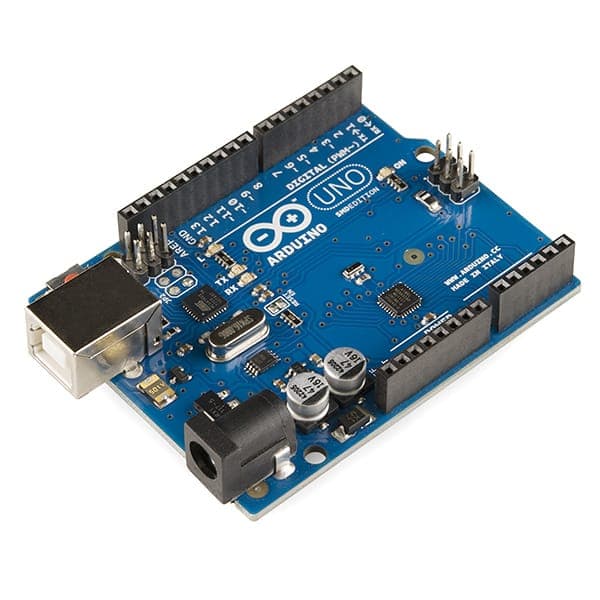
Figure: Arduino Uno - The most popular beginner-friendly microcontroller for robotics
Arduino Mega:
Processor: ATmega2560 @ 16 MHz
RAM: 8 KB SRAM
Flash: 256 KB
Digital I/O: 54 pins (15 PWM)
Analog inputs: 16 (10-bit)
Power: 5V
Cost: ~$40
Best for: Complex robots needing many sensors/outputs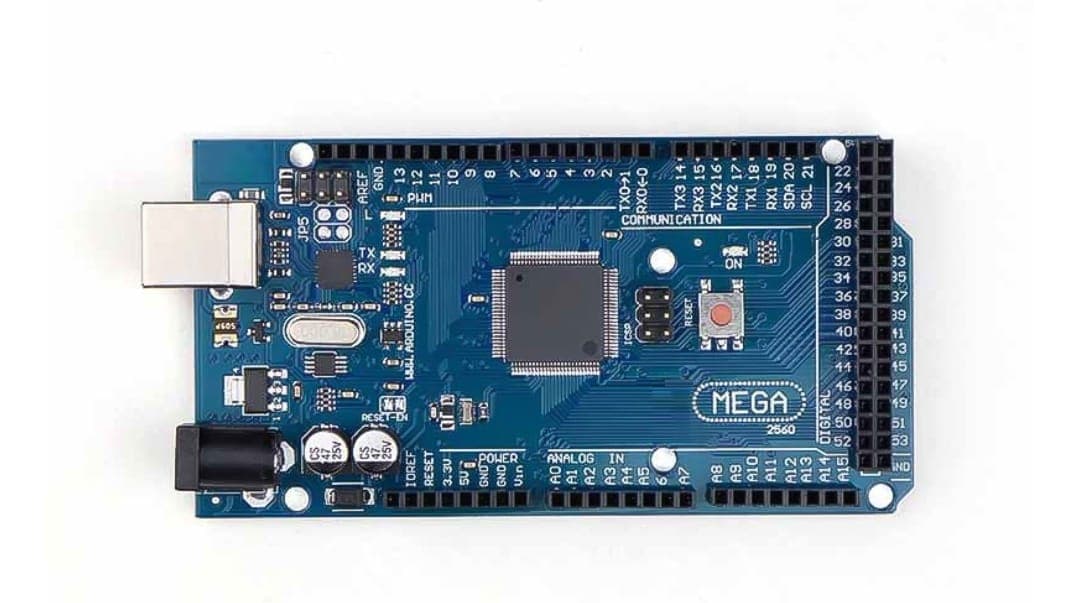
Figure: Arduino Mega - ideal for robots requiring many I/O connections
ESP32
Processor: Dual-core Xtensa 32-bit @ 240 MHz
RAM: 520 KB SRAM
Flash: 4 MB
Digital I/O: 34 pins (16 PWM)
Analog: 12 ADC (12-bit)
WiFi: Built-in 802.11 b/g/n
Bluetooth: BLE v4.2
Power: 3.3V
Cost: ~$10-15
Best for: IoT, connected robots, more processing power
Raspberry Pi (Single-board computer, not true MCU)
Processor: ARM Cortex-A (varying by model)
RAM: 1-8 GB (Pi 4: 4-8GB)
Storage: microSD card (32+ GB)
GPIO: 40 pins (28 usable)
USB: For peripherals
Power: 5V via micro-USB
Cost: ~$35-75 (Pi 4)
OS: Linux-based
Best for: Complex AI, vision processing, full OS
Microcontroller Comparison
| Feature | Arduino Uno | Arduino Mega | ESP32 | Raspberry Pi 4 |
|---|---|---|---|---|
| Clock | 16 MHz | 16 MHz | 240 MHz | 1.5 GHz |
| RAM | 2 KB | 8 KB | 520 KB | 4 GB |
| Digital I/O | 14 | 54 | 34 | 28 GPIO |
| PWM channels | 6 | 15 | 16 | Via library |
| Analog input | 6 | 16 | 12 | Via ADC HAT |
| WiFi | Via shield | Via shield | Built-in | Via Ethernet/WiFi |
| Power | 5V | 5V | 3.3V | 5V |
| Cost | $ | $$ | $ | $$$ |
Pinout and I/O Basics
Arduino Uno Pinout
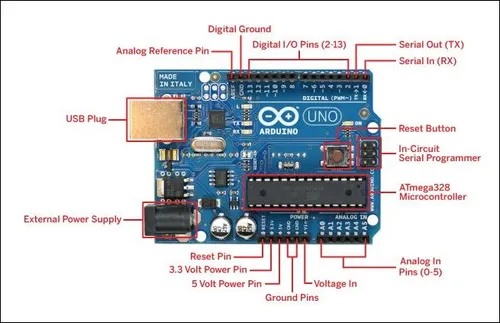
Pin Capabilities
Digital I/O (High/Low):
- Used for buttons, switches, motor direction

PWM (Pulse-Width Modulation):
- Pin 3, 5, 6, 9, 10, 11 on Uno
- Control motor speed, LED brightness

Analog Input (ADC - Analog to Digital):
- Pin A0-A5
- Read 0-1023 values from sensors

UART/Serial (Tx/Rx):
- Pin 0, 1
- Communication with computer

I2C (SDA/SCL):
- Pin A4, A5 (SDA), A5 (SCL)
- Protocol for sensors (IMU, pressure, etc.)

SPI (MOSI/MISO/SCK/SS):
- Pin 11, 12, 13 + others
- Protocol for faster communication
Selection Guide
Choose Based on Application
Budget Mobile Robot
Requirements:
- 2 DC motors (direction + speed)
- 3 sensors (ultrasonic, IR, etc.)
- Simple obstacle avoidance
Recommended:
- Arduino Uno
- Reasons: Enough I/O, simple programming, cheap
Pins needed:
Motor 1: PWM (1), Dir (2) = 2 pins
Motor 2: PWM (1), Dir (2) = 2 pins
Ultrasonic: Trig (1), Echo (1) = 2 pins
IR sensors: 2 analog pins
Total: 8 pins (Uno has plenty)
Complex Manipulator
Requirements:
- 6 servo motors (joint control)
- 4-6 sensors
- Real-time feedback
- WiFi monitoring
Recommended:
- Arduino Mega or ESP32
- Arduino Mega: 15 PWM channels for servos
- ESP32: Same features + WiFi
Pins needed:
Servo 1-6: 6 PWM pins
Motor driver: 3 pins
Sensors: 4 pins
Communication: 2 pins (serial)
Total: 15 pins (both have enough)

WiFi: Use ESP32 for built-in WiFi
Industrial-Grade Platform
Requirements:
- Multiple motor controllers
- 20+ sensors
- Precise control (PID loops)
- High performance processing
Recommended:
- Raspberry Pi 4 (not true MCU, but powerful)
- Or: ESP32 + additional MCU
Setup:
Raspberry Pi 4 (main brain):
- Image processing
- Complex logic
- WiFi/Ethernet
  ↓
Arduino Mega (motor controller):
- Motor drivers
- PID loops
- Real-time sensor reading

I2C connection between them
AI-Powered Robot
Requirements:
- Video processing
- Machine learning inference
- Real-time vision
- GPU support helpful
Recommended:
- Jetson Nano (if GPU needed)
- Raspberry Pi 4 (budget option)
- x86 Mini-PC (maximum power)
Typical setup:
Jetson Nano / Raspberry Pi (AI processor)
  ↓
Arduino Mega (motor controllers)
  ↓
Actuators/Motors
  ↓
Sensors → Feed back to AI processor
Basic Programming Concepts
Arduino Programming Flow
void setup() {
  // Run once at startup
  // Initialize pins, set baud rate
  pinMode(LED_PIN, OUTPUT);
  Serial.begin(9600);
}

void loop() {
  // Run repeatedly
  // Main robot control logic
  digitalWrite(LED_PIN, HIGH);
  delay(1000);
  digitalWrite(LED_PIN, LOW);
  delay(1000);
}
Common Functions
| Function | Purpose | Example |
|---|---|---|
| pinMode() | Set pin as input or output | pinMode(13, OUTPUT); |
| digitalWrite() | Set digital pin high/low | digitalWrite(13, HIGH); |
| digitalRead() | Read digital pin state | int val = digitalRead(2); |
| analogWrite() | PWM output (0-255) | analogWrite(3, 128); |
| analogRead() | Read analog (0-1023) | int val = analogRead(A0); |
| delay() | Pause in milliseconds | delay(1000); |
| Serial.print() | Send to computer | Serial.println("Hello"); |
Motor Control Example
const int motorPWM = 3;  // PWM pin
const int motorDir1 = 4; // Direction pin 1
const int motorDir2 = 5; // Direction pin 2

void setup() {
  pinMode(motorPWM, OUTPUT);
  pinMode(motorDir1, OUTPUT);
  pinMode(motorDir2, OUTPUT);
}

void motorForward(int speed) {
  // Speed 0-255
  digitalWrite(motorDir1, HIGH);
  digitalWrite(motorDir2, LOW);
  analogWrite(motorPWM, speed);
}

void motorBackward(int speed) {
  digitalWrite(motorDir1, LOW);
  digitalWrite(motorDir2, HIGH);
  analogWrite(motorPWM, speed);
}

void motorStop() {
  analogWrite(motorPWM, 0);
}
Power Considerations
Microcontroller Power Supply
Arduino: Requires stable 5V
ESP32: Requires stable 3.3V
Raspberry Pi: Requires stable 5V (2A+ for Pi 4)
BEC (Battery Elimination Circuit)
For battery-powered robots:
Battery (12V) → Buck converter → 5V, 2A
                                 ↓
                         Microcontroller
                         + Motor drivers
Current Draw
| Device | Typical Draw | Peak Draw |
|---|---|---|
| Arduino Uno | 50 mA | 100 mA |
| ESP32 | 80 mA | 200 mA |
| Raspberry Pi 4 | 600 mA | 1500 mA |
| Motor driver | 50 mA | Variable |
Communication Protocols
Serial (UART)
Simplest communication:
Arduino TX (pin 1) → Computer RX
Arduino RX (pin 0) → Computer TX
Baud rate: 9600 typical

Use: Debugging, simple data transfer
I2C (Two-wire)
For multiple sensors:
Arduino SDA (A4) ← Sensors share
Arduino SCL (A5) ← these two lines

Use: IMU, compass, pressure sensor
SPI
Faster than I2C:
Arduino MOSI (11) → Device IN
Arduino MISO (12) ← Device OUT
Arduino SCK (13) → Clock
Arduino SS (10) → Select

Use: High-speed SD card, sensor modules
Summary
Microcontroller Selection:
✓ Arduino Uno: Best for learning, simple robots ✓ Arduino Mega: More I/O for complex robots ✓ ESP32: Affordable with WiFi/Bluetooth ✓ Raspberry Pi: For AI/vision, full OS ✓ Jetson Nano: GPU for AI/ML
Key Specs to Check:
- Clock speed (MHz)
- RAM (affects program complexity)
- Flash (affects program size)
- Number of I/O pins (I2C, SPI, PWM)
- Power requirements
- Cost and availability
Typical Robot Brain:
- Simple: Arduino Uno
- Medium: Arduino Mega or ESP32
- Complex: Raspberry Pi 4 + Arduino for real-time control
How is this guide?